- Industry-standard, respected thermal paste brand
- Comes in an affordable package
- Easy to apply with the applicator
- I don't think it's magical, just a thermal paste
- Based on temperature measurements, it doesn't reduce the heat
- It acts as an insurance between two hot surfaces so you know you separated them without introducing any conductivity
Hello there, and welcome back to yet another review article for you! This time, we will examine a highly acclaimed thermal paste from Thermal Grizzly, Kryonaut. In this brief review, I will share basic details about thermal paste and provide a sped-up video on how to apply it to your laptop’s CPU and GPU.
Table of Contents
What is Thermal Paste?
Thermal paste (also known as a thermal compound, thermal grease, thermal gel, or heat sink paste) is a thermally conductive, but almost always electrically non-conductive chemical compound that is used between heat sinks and heat sources (such as CPU or GPU). The main function of thermal pastes is to eliminate air gaps and space from the contact area of these internal components and to maximise heat transfer. Thermal pastes don’t act like glue in between these internal PC or laptop components, and they are required to be held together with the help of pressure coming from heatsinks.
Please consider supporting this blog by buying your gear from Thomann using my links at no extra cost to you, many thanks!

Do I Have to Buy Thermal Paste?
All PCs and laptops actually come with thermal paste applied out of the factory as it’s a standard procedure to create this interface between CPU, GPU and heatsinks. So, actually, you don’t need to buy thermal paste and apply it when you buy your PC and laptop. However, it is recommended that you renew the thermal paste after 3-4 years of usage, as thermal paste tends to dry up and lose its thermal conductive features. Currently, I have a Victor-branded laptop (based on the Clevo W65 67SJ model), which I have been using for the last 7+ years. Victor brand was a Turkish custom laptop manufacturer that would customise Clevo laptops in Turkey. Unfortunately, the company went bankrupt right after I bought my laptop 🙂 To be honest, I was concerned about the warranty, but it has never let me down, not even once since 2015. Throughout the years, I gradually upgraded and changed the components of my laptop as I thought it was worth it. 
As of now, I maxed out everything upgradable, such as RAM, and additional HDD using a caddy that replaced the CD-ROM. However, I never thought about renewing the thermal paste and upgrading it with a well-known brand. Recently, I noticed my laptop getting really hot while using CPU-heavy software or rendering. The laptop fan was frequently working hard to cool it down. So I started researching to see if there was anything I could do about this. 
Thermal Grizzly Kryonaut
While researching this specific topic, I ended up renewing the thermal paste as my laptop was already 7+ years old, and this was never done before. The thermal paste topic is a pretty complicated one, especially if you dare to tap into the gamers’ overclocking world! 🙂 There are countless thermal paste brands, product types and comparison videos out there. As I’m not an expert on this topic, I’m not going to provide a full-blown comparison of thermal pastes in the market. However, I will definitely make use of other people’s expertise to provide you with a simple insight into this topic. While I was looking for a thermal paste, I realised that Thermal Grizzly is a highly respected company. Thermal Grizzly is a German company that specialises in cooling solutions. They feature tons of thermal pastes and relevant accessories.
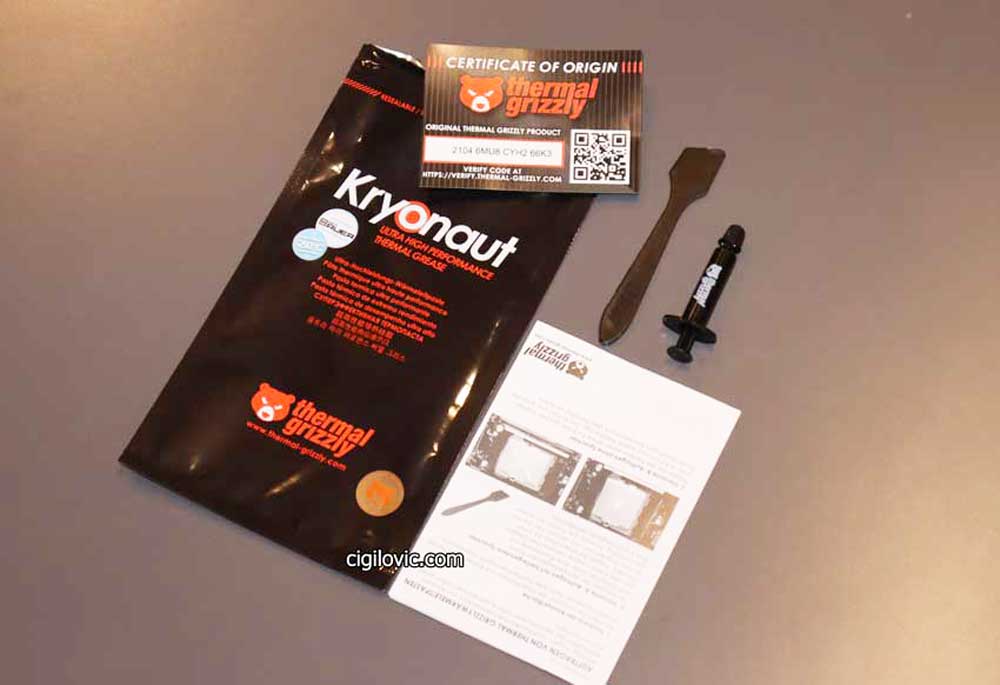
Before I bought Thermal Grizzly Kryonaut thermal paste, I watched a couple of comparison videos as well as read some articles and user feedback.

How to Apply Thermal Paste?
Until I watched this below by Gthe amers Nexus channel, I thought these fancy-named, premium-feel thermal pastes would make a day and night difference. Also, I thought how you apply the thermal paste was also so critical and could change anything.
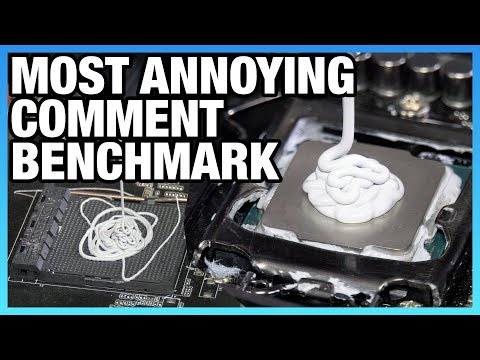
However, I don’t think there’s much of a difference, as you can see in the video. Under the video I uploaded to YouTube (below), there were already people commenting on how wrong I was with regard to how I applied this thermal paste :). Especially, if you go for a respected brand like Thermal Grizzly and apply an X-pattern (as suggested), pea-sized drops, a little less or a little more, it gives pretty much the same results. So before I applied the Thermal Grizzly Kryonaut, I watched this video and kinda got relaxed about it! 🙂 Having said that, I was more curious about the difference between a factory-applied, 7-year-old thermal paste vs a premium thermal paste, freshly applied. With this curiosity in mind, I quickly attempted to apply the thermal paste. After having removed the back lid and screws, I managed to remove the heat sink. But what was shocking to me was the amount of dirt and gunk stuck in the air outlet! Check out the video and see how much stuff got stuck there! 🙂
Only fools keep their cash in a bank account! Let your money work for you with the most trustworthy broker ever!

I cleaned this up with a vacuum cleaner and then also used some isopropyl alcohol to degrease it. I also needed to clean the old thermal paste using Lotus Degreaser, which contains a high concentration of isopropyl alcohol. You can use any isopropyl alcohol product here. Please also see in the video how shiny the CPU, GPU and heatsink became, almost like a mirror!
Thermal Paste Application Video
As you can see in the video below, I just added a pretty good amount of Thermal Grizzly Kryonaut both on the CPU and GPU. And didn’t even spend time spreading it with the spatula that came with the Kryonaut.

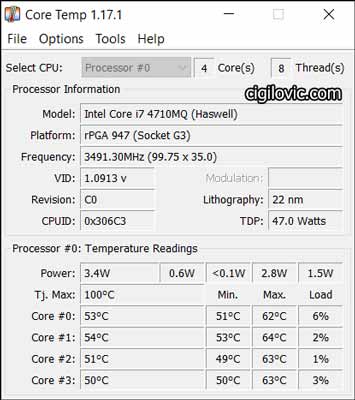
Before I even started recording this attempt, I had already opened up my laptop and was using it for web browsing for an hour or so. During that time, I wanted to measure the CPU core temperatures using Core Temp software. I also did the same after having applied Thermal Grizzly Kryonaut and again measured the temperature with Core Temp.
And these are the results after I applied the new thermal paste.
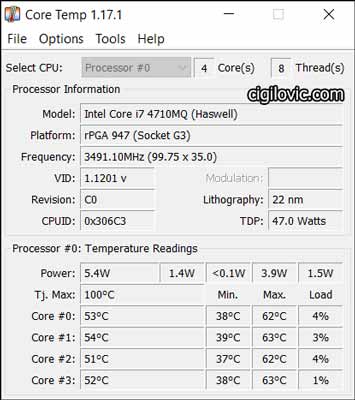
I don’t see any difference here. However, my laptop got quieter, and also the heat over the mouse pad decreased slightly. I wonder why!
Worth it?
I think it was just due to the realisation of what’s stuck inside the heatsink. Before that day, I had never got curious and removed the heatsink. I would always clean the air outlet using compressed air, but I never cleaned it that deeply. I think for general consumers, these won’t make a huge difference. I can not really prove to you that a premium thermal paste made a huge difference. It was kind of an upsetting moment because most of the user reviews claim that their laptops and PCs went quiet after using this product. 
I don’t think there’s a direct correlation here! I wonder if those users also happened to clean that gunk which got stuck there for years and realised their computers got cooler and quieter! All I know is that I went for an industry-standard, particularly premium thermal paste and renewed the factory default thermal paste, which was already 7+ years old. As you are already aware, I really like doing simple comparisons from a generic user perspective and sharing the outcomes with you because I like to debunk highly exaggerated value claims by consumers who are dying to justify their purchases to the max! What do you think about my findings? Let me know using the contact form below!
Pricing & Availability
As I mentioned, I purchased mine from Alza.sk, a popular online store in Slovakia. This website doesn’t ship to any location. So, I suggest you check out the links on Amazon.
Check out Thermal Grizzly on Amazon here
I hope you like this brief article. Thank you for visiting my blog and for your support so far! I will hopefully see you in the next review here!