- Possibly the best compact yet tough MIDI controller ever made
- Very unique, pioneering design that's ahead of its time
- Very easy to use and compatible with everything
- Very difficult to supply
Hello there and welcome back to yet another cool review article! This time, we will look at one of the most ingenious and *tough MIDI keyboards and controllers by Keith McMillen, QuNexus! As I promised to release this review in one of my best-performing reviews, “The Ultimate Comparison of Best MIDI Controllers Review“, here is my review of QuNexus by one of the most progressive and innovative companies, Keith McMillen Instruments!
Table of Contents
As we always do, I will give you a quick introduction to this very unique company, Keith McMillen, as well as a historical overview of the company’s product line.
About Keith McMillen Instruments
Keith McMillen Instruments (KMI) is an innovative music technology company dedicated to creating cutting-edge hardware and software for musicians, producers, and performers. Founded by Keith McMillen, a visionary in the world of electronic music and instrument design, KMI specialises in developing expressive, portable, and highly responsive MIDI controllers and performance tools that empower artists to push the boundaries of music creation.
With a strong focus on advanced sensor technology, human-computer interaction, and intuitive design, KMI products, such as the QuNeo, K-Board, SoftStep, and BopPad, are trusted by musicians worldwide for their versatility, durability, and groundbreaking capabilities. Whether in the studio or on stage, KMI’s innovations continue to redefine the way musicians interact with their instruments, making high-performance tools accessible to artists of all levels. 
At KMI, the mission is simple: to design technology that enhances creativity, expands musical possibilities, and makes expressive performance more intuitive than ever.
About Keith
Unfortunately, I got notified about a LinkedIn post about Keith, whom I followed on most of the companies in the MI business, passing away at the age of 67! 🙁
Keith McMillen is not only a brand name but the real name of an extremely innovative musical instruments designer. He has been designing groundbreaking musical instruments for about 40 years now. A pioneering force in audio and music technology passed away in August 2024. leaving behind a legacy of innovation and a profound impact on the music industry. Born July 10, 1957, in Bermuda, Keith dedicated his life to revolutionising how live interactive music is played and experienced. A passionate advocate for the intersection of technology and music, Keith laid his academic foundation at the University of Illinois, where he earned a BS in Acoustics under the mentorship of James Beauchamp.
He further honed his skills in classical guitar and composition under the guidance of Herbert Brun, Scott Wyatt, and Sal Martirano. Over the years, Keith developed MAPPS, an integrated computer composition, notation, and performance system that became the bedrock of his group TrioMetrik.

Keith’s professional journey began in 1979 when he founded Zeta Music, a company that would become synonymous with the modern violin. His revolutionary electronic instrument designs set new standards in the music industry, creating a market that continues to influence musicians today.
In 1992, as Vice President at Gibson Guitars, Keith founded G-WIZ, an R&D lab where he developed ZIPI, a groundbreaking musical instrument control language that evolved into the Open Sound Control (OSC) protocol and laid the foundation for MPE and MIDI 2.0.
In 2005, Keith founded Keith McMillen Instruments, a company that quickly became known for its cutting-edge approach to musical technology using patented Smart Fabric sensors. Keith established the company to bring his innovative vision to life, and under his leadership, KMI introduced groundbreaking products that combined Smart Fabric with musical artistry, including the K-Bow, QuNeo, QuNexus and K-Board Pro.
These instruments, recognised for their versatility and advanced capabilities, reflected Keith’s dedication to pushing the boundaries of what was possible in music technology. His work through the company solidified his reputation as a pioneer in the field and left a lasting impact on the music industry.
In 2014, Keith founded BeBop Sensors with a mission to expand Smart Fabric applications into the fields of wearable sensors and haptics. This led to the development of several products and patents, including virtual reality gloves and insole sensors.
This work inspired Keith to form Sensible Robotics, a new company where Keith focused his full attention on Making Robots Feel Better™ by using Smart Fabric to develop robotic skin.
Keith McMillen’s work exemplified a lifelong commitment to exploring how computer intelligence and user interface can enhance and expand musical performance. His passing is a great loss to the world of music and technology, but his innovations and achievements will continue to inspire and shape the future of both fields. 
History of Keith McMillen Instruments’ Products
Since its founding, Keith McMillen Instruments (KMI) has been at the forefront of music technology, designing innovative MIDI controllers and performance tools that revolutionise the way musicians create and interact with sound. Below is a timeline of some of KMI’s most notable products:
2009 – SoftStep
KMI introduced the SoftStep, a revolutionary multi-touch foot controller featuring pressure-sensitive keys, designed for musicians who need hands-free control of effects, loops, and software instruments.
2011 – 12 Step
Following the success of SoftStep, KMI released 12 Step, a versatile foot controller designed for MIDI bass pedal applications, allowing players to trigger notes and chords with their feet.
2012 – QuNeo
The QuNeo redefined the traditional pad controller, offering ultra-sensitive multi-touch pads, sliders, and rotary sensors with visual feedback. Its compact design and advanced sensor technology made it a favourite among electronic musicians.
2013 – QuNexus
The QuNexus brought polyphonic aftertouch, pressure-sensitive keys, and CV/Gate compatibility to a compact MIDI keyboard, making it an excellent tool for both hardware synth and modular users.

2014 – K-Board
KMI introduced the K-Board, a simplified, durable, and ultra-portable MIDI keyboard designed for musicians on the go, featuring expressive touch-sensitive keys.
2016 – BopPad
The BopPad percussion controller offered drummers and percussionists a highly responsive, velocity-sensitive playing surface, capable of transmitting MIDI data for both acoustic and electronic performance setups.
2017 – K-Board Pro 4
Building on the original K-Board, KMI launched the K-Board Pro 4, a four-octave MPE (MIDI Polyphonic Expression) keyboard that brought expressive control and advanced gestural input to modern musicians.
2020 – K-Mix
The K-Mix redefined the audio interface and mixer category by providing a versatile, touch-sensitive mixing and audio interface solution without traditional faders or knobs.
Rebranding as Muse Kinetics
Keith McMillen Instruments has announced they are rebranding as Muse Kinetics. This transformation comes as the company pays tribute to its visionary founder, Keith McMillen, who passed away in August 2024. Keith’s legacy of innovation and musical expressiveness continues to inspire the company as it embarks on a new chapter.
In the past several years, Keith McMillen Instruments has undergone substantial changes while introducing new features, colours, and software updates to an enhanced product lineup. The company has also made significant improvements in their core technology, quality control and customer service, all to amplify the potential of its instruments to inspire creativity.
The company’s new name, Muse Kinetics, embodies the dynamic relationship between musicians and their instruments: “Muse Kinetics is what we practice as musicians, and the instruments that we make are all designed to measure force and respond to creative gestures and articulated motions that are inspired and give inspiration to others.” 
New Muse Kinetics Branded Products:
QuNexus Galaxy – A new colour option, available now!
BopPad Galaxy – A new colour option, available now!
12 Step2 – In stock now!
SoftStep3 – Available in October.
Accessories: Step Adapter Kit, QuNexus Adapter Kit, MIDI Out Adapter Cable
The company will continue to offer select products under the Keith McMillen Instruments name until inventory is refreshed, including:
K-Board C (available in all 5 colours)
K-Board Pro 4
Accessories: BopPad Mount, MIDI Expander, K-Board Pro Case
Please note that the K-Mix and QuNeo have been officially discontinued, and no remaining stock is available.
Keith McMillen QuNexus
QuNexus is a powerful MPE keyboard controller and three-track arpeggiator/step sequencer. 25 touch-sensitive keys detect velocity, polyphonic aftertouch, and per-key tilt, giving you unprecedented control and musical expression. Each of the three arpeggiator/sequencer tracks can be programmed with up to 32 steps and 10 selectable arpeggiator patterns, and can be independently assigned to USB, MIDI, and Eurorack outputs. Blue and white LEDs illuminate the keys during arpeggiations, step sequences, and playback.
QuNexus can control MIDI hardware using the included MIDI Out cable or our optional MIDI Expander (sold separately). You can connect to modular synthesisers via the gate, three CV outputs, and two CV inputs, all of which can be assigned using the QuNexus editor, which is compatible with Windows and macOS. I was lucky enough to have bought the last QuNexus in the official Turkish distributor’s stock back in 2016 and have been using it from time to time since then.
I must say, even though I have bought and sold so many musical instruments, audio equipment and gear in the last 20 years, my QuNexus is still with me and even relocated to different cities and countries with me 🙂 (sending greetings to you from Bratislava!)
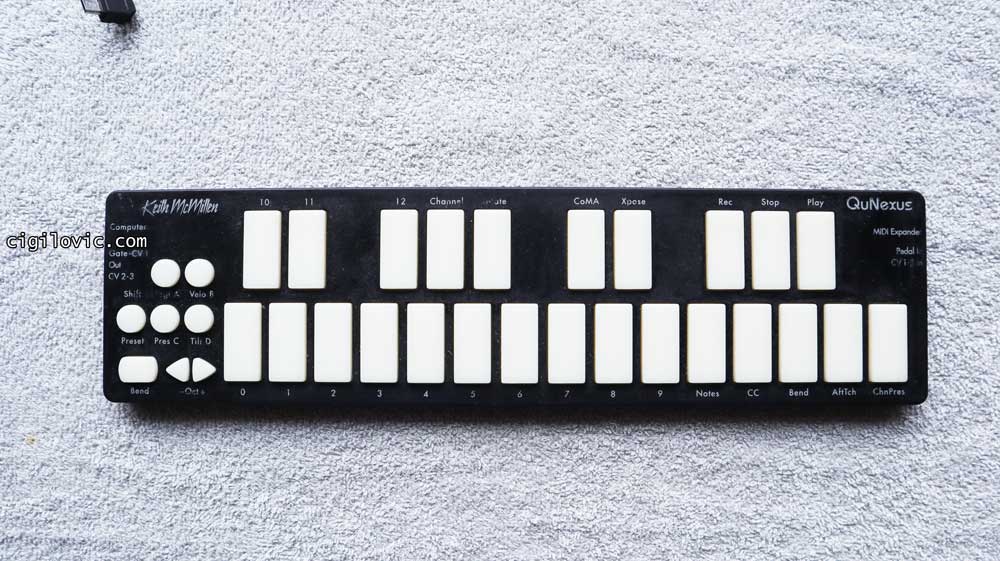
After years of use, I wanted to sell my QuNexus and switch to a more generic product offering from companies such as AKAI. I also even attempted to get myself an NI Maschine and completely felt paralysed and had to return it! None of the units could provide me with the ease of use, portability and fun right out of the box! I tried the AKAI MPK Mini but completely got lost while I was trying to figure out how to set velocity and everything.
The NI Maschine was completely out of my comprehension, and I couldn’t even figure out how to use it properly. I downloaded and installed the entire software suite and got lost in the process of doing so!
Only fools keep their cash in a bank account! Let your money work for you with the most trustworthy broker ever!

Keith McMillen QuNexus Red
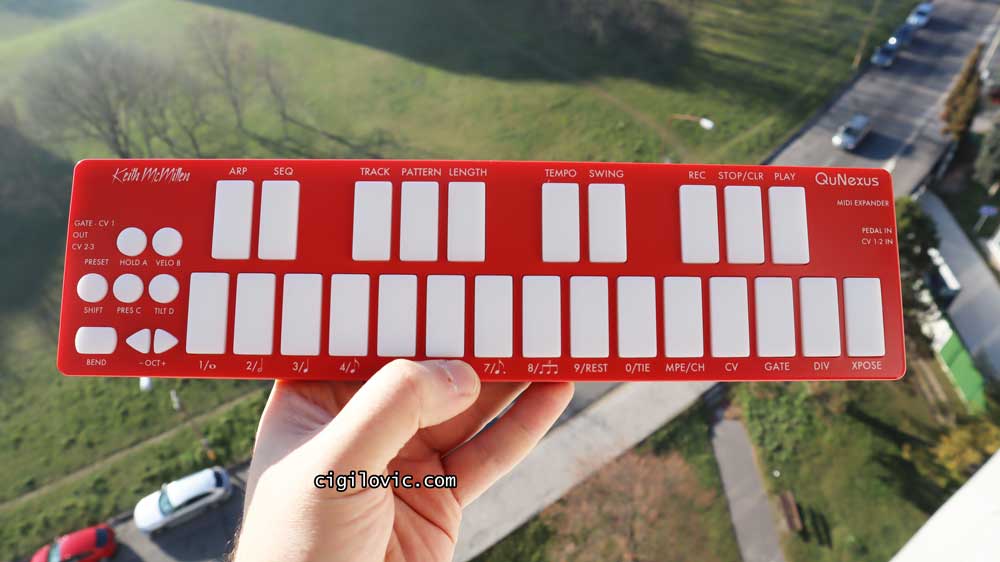
For those reasons, I decided to go back to QuNexus this time with the Red version.
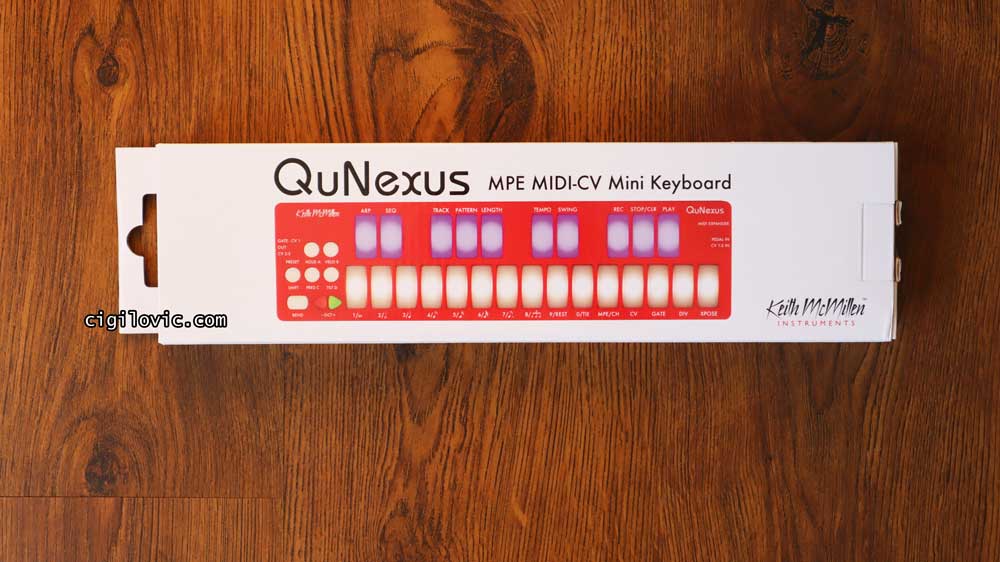
QuNexus Red version is pretty much the same product but comes with some improvements. To be honest, the most important thing for me was that it shouldn’t get sticky over time! As I mentioned in the first iteration of the article (which you will find below), the original black version got really sticky over time without me doing anything at all. Even though it functioned the same, it was pretty annoying! To solve this issue, the company proposed a solution for me: I may use isopropyl alcohol and wipe the sticky, rubbery layer of plastic. It was also suggested that I could get the new red chassis, which wouldn’t introduce such problems.
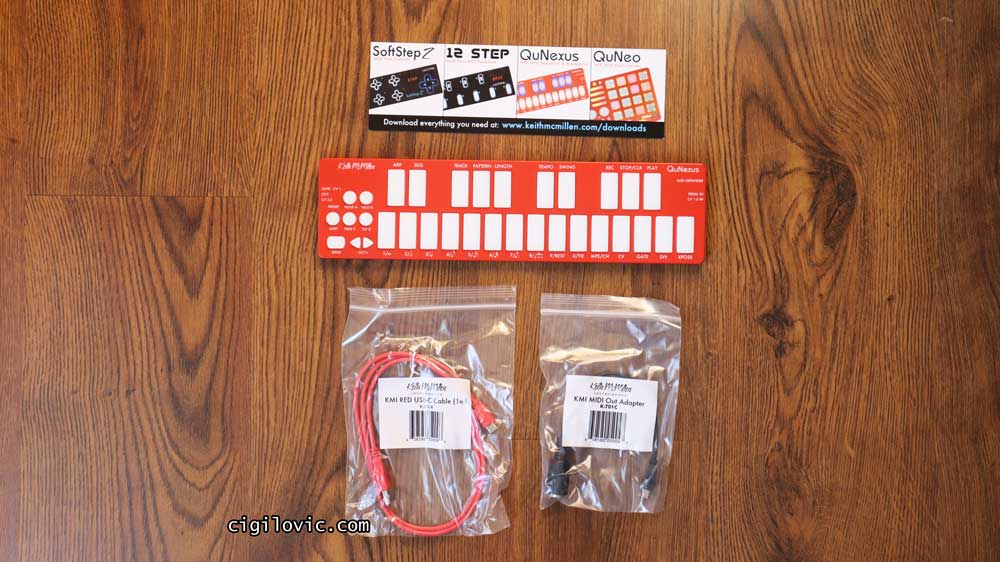
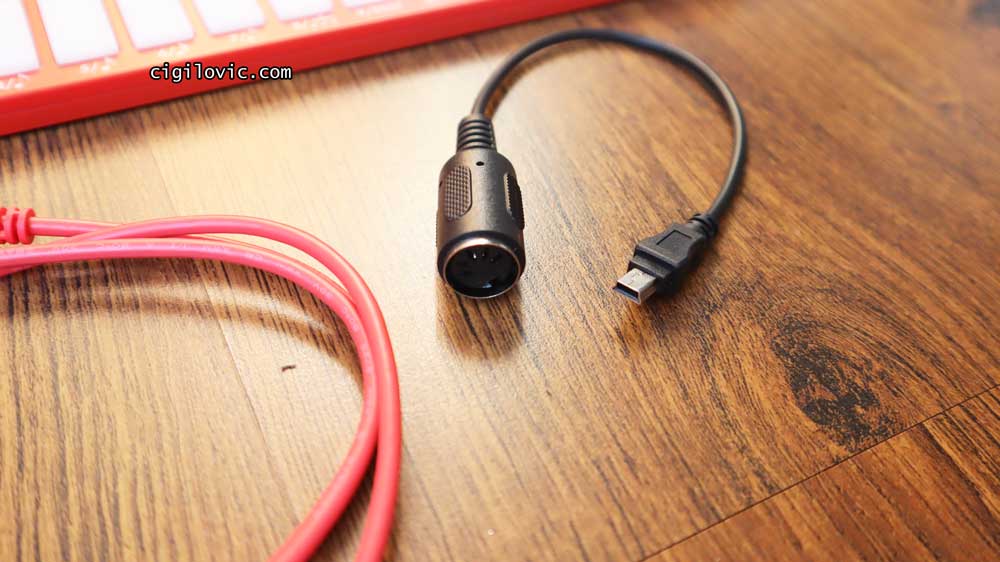
I must say I’m pretty impressed with the red version as it’s perfectly fine on the outside and it functions exactly the same for my needs. I was literally able to plug this in and start triggering sounds! QuNexus Red comes with pretty much the same box content, but this time we also have a USB Micro MIDI Expansion Connector included in the box.
USB Cable is also upgraded. This time we have a red version with USB-C. I think they just nailed it with these little changes.
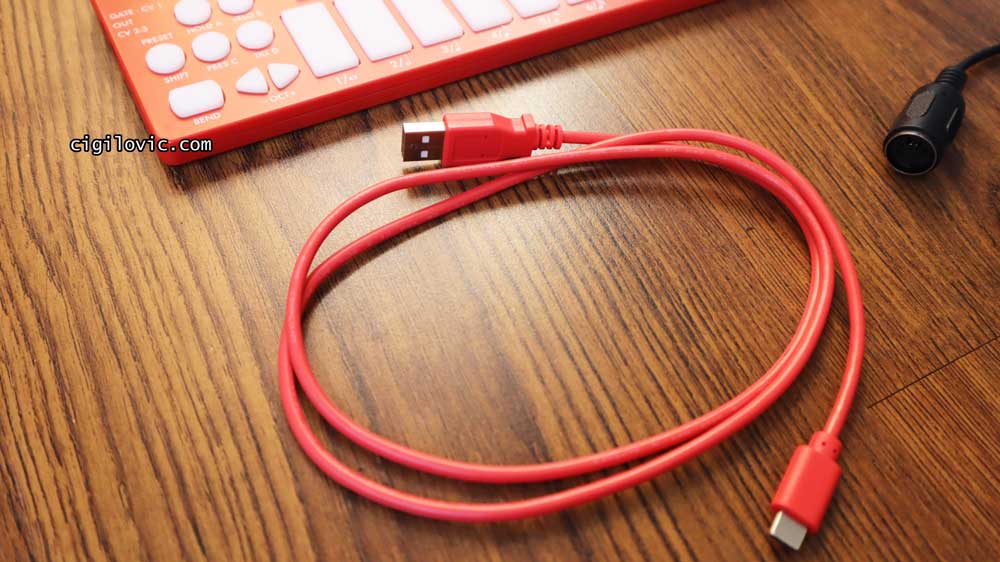
Here’s another shot of the QN Red on the wooden floor! 🙂
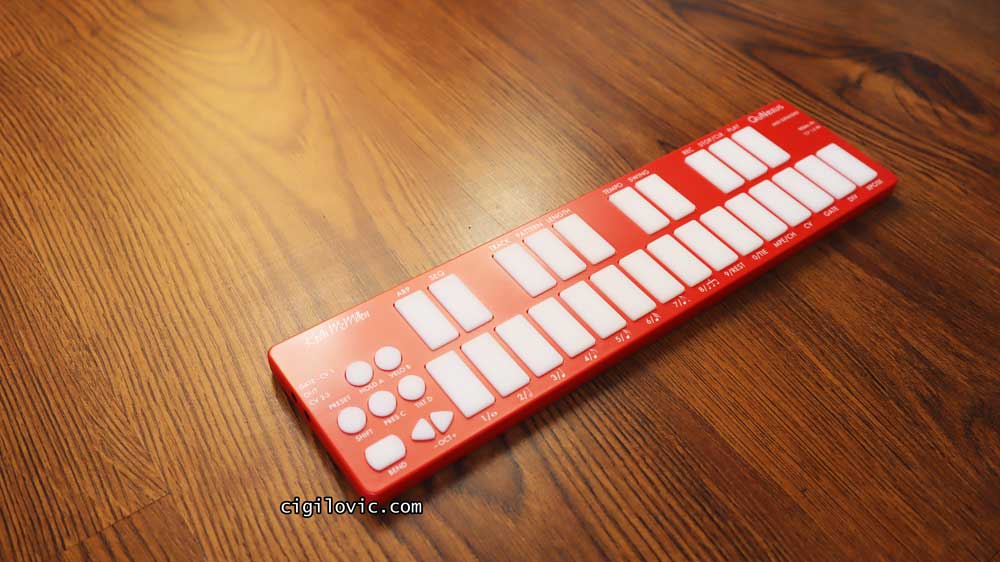
As you can also see from the images, there are now many different labels used to indicate the alternative features of all these pads. As with the original one, the Red version is also made in China and offers pretty much the same quality. Of course, the Red plastic casing is very smooth and not like the rubber one that most complained about in the original version.
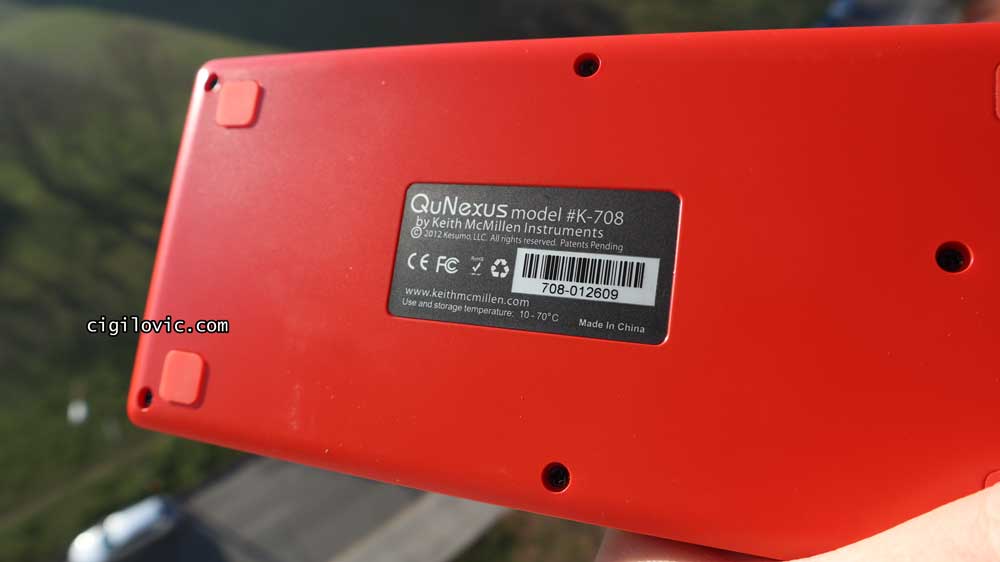
I had made a quick demo of my QuNexus and wanted to share it with you here.

Let’s quickly go through the technical specifications of QuNexus, then I will explain the most important features that it offers.
Tech Specs
| Keith McMillen QuNexus | Tech Specs |
|---|---|
| Keys | 25 Touch Sensitive |
| Dimensions (mm) | 325 x 84 x 11 |
| Dimensions (inch) | 12.8 x 3.3 x 0.43 |
| Weight | 345 g / 0.76 lb |
| Connections | USB (MIDI) |
| Gate-CV1 OUT | |
| CV 2-3 | |
| MIDI Expander | |
| Pedal / CV 1-2 In | |
| Cable | USB A-to-Micro (included) |
| Power Requirement | USB Powered |
Connection Options
There are a couple of different connection options QuNexus offers.
Connect QuNexus to your computer
With a supplied USB-A-to-Micro cable, you can directly connect your QuNexus to your computer without having to install drivers or any additional software. QuNexus will be powered via your USB port.
Connect QuNexus to your iPad
To connect your QuNexus to your Apple iPad, you need to get yourself an iPad camera connection kit.
Connect QuNexus to MIDI Hardware (Powered by MIDI Expander)
If you prefer connecting your QuNexus to a hardware MIDI device, you need to purchase a Keith McMillen MIDI Expander, then follow the steps here. Connect the QuNexus Mini port (Labelled as MIDI Expander) to the USB ‘Expand’ port on your MIDI Expander by using a USB A-to-Mini cable.
Connect the power supply to the MIDI Expander USB ‘Power‘ port. Finally, connect the MIDI Out on the MIDI Expander to the MIDI IN on a synth or other MIDI devices you would like to use.
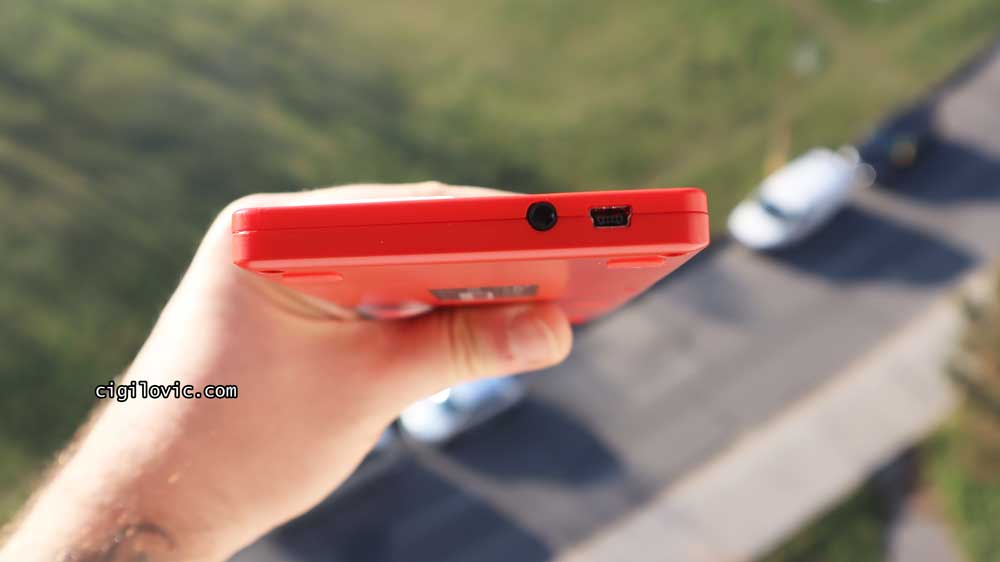
Connect QuNexus to MIDI Hardware (Powered by your computer)
You can also use a similar approach and connect your QuNexus to MIDI hardware by powering it via your computer. You will also need to get yourself the MIDI Expander. Connect the QuNexus Mini port (Labelled as MIDI Expander) to the USB ‘Expand’ port on your MIDI Expander by using a USB A-to-Mini cable.
Only fools keep their cash in a bank account! Let your money work for you with the most trustworthy broker ever!
Connect your QuNexus micro port to your computer by using a USB A-to-Micro cable. Finally, connect the MIDI Out on the MIDI Expander to the MIDI IN on a synth or other MIDI devices you would like to use.
Connect QuNexus to Synths or other CV devices
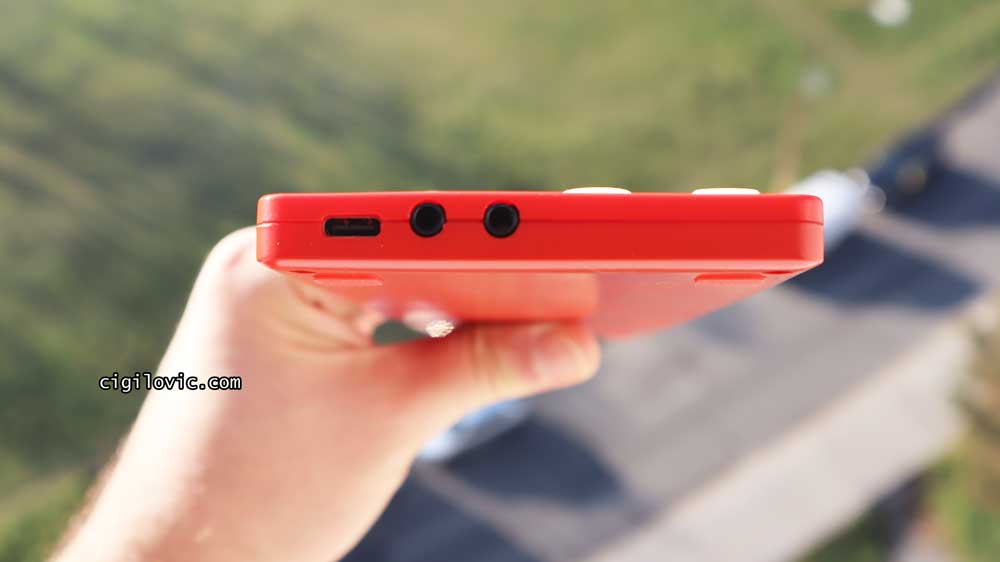
There are 3 ways to connect your QuNexus to Synths or CV devices. I will be mentioning just the first basic one as this topic is pretty broad. Connect your QuNexus micro port to a USB port either on your computer or on your iPad, which will provide power to QuNexus. Use a cable that is compatible with your CV device ports and make sure one end can plug into one of the stereo 1/8″ IN on CV outs on QuNexus. If you want to get more details about alternative CV connections, I highly suggest you check out the official QuNexus manual, which has plenty of detail for all your questions.
Keys
QuNexus features 25 touch-sensitive keys that can react to velocity, pressure and tilt actions. The Tilt feature is purely based on Keith McMillen Instrument‘s Smart Sensor technology and provides extreme levels of sensitivity to your finger pressure. Also, with the provided QuNexus editor, you can freely assign any MIDI CC to velocity, pressure or tilt attributes. There’s also a “Bend” button on the left-hand side to use for pitch-bending purposes. Note that you can also adjust the range of this button within the editor.
Keyboard and piano players might find QuNexus‘s keys a bit difficult to adapt to, as they have already been spending their time on regular-sized keys on their instruments. However, I’m pretty sure that after getting used to it, they will be able to perform songs on this ultra-mini controller.
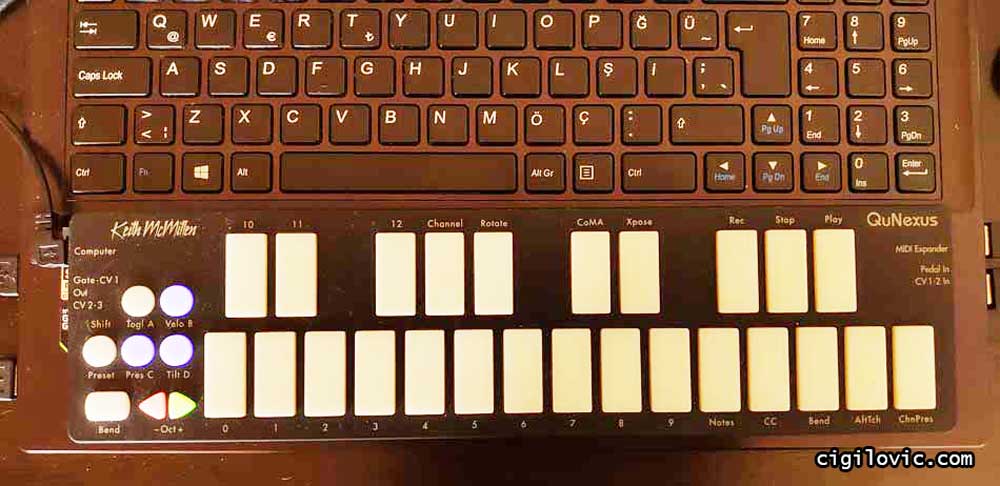
As far as non-keyboard/piano players (just like me!), I must say it’s quite fun to discover keyboard/piano layouts in a tiny space. The reason I went for QuNexus is the unique features it offers, such as being able to control almost anything while having an ultra-portable, durable and expressive controller in my hands. But to be honest, the first reason was to be able to trigger drum patterns with my fingers, not with my mouse clicks! I mean, who would prefer using their mouse clicks to lay down patterns when you can just do it with an added human touch to it? Here’s an example of work that I made by using my QuNexus and XLN Addictive Drums VSTi.
Control Keys on the Left Panel
There are 6 other buttons on the left panel of QuNexus. Your classic octave up and down arrows (also can be used as cursors in Live Edit mode), 4 preset buttons (also function as ON/OFF for Toggle, Velocity, Tilt and Pressure attributes) and a bend button, which you can use for bending pitches.
When you activate the “Toggle” function, you can just press a key, and it will hold the note forever until you press it again. I’m sure there are millions of ways to use this function in a creative approach. However, I just want to show you how I used it in the most spoiled way in the video below. 😀
I needed to have a drone sound to back up my fretless guitar attempt, so I just set a synth tone with reFX Nexus, activated “Toggle“, and hit a note!
Check out my The Best Strings for Fretless Electric Guitar here.
You can also use this function to build chords or use it as an ON/OFF function to turn on FX channels and tracks.
Preset Keys
QuNexus features 4 pre-made presets that you can fine-tune, edit and change within the QuNexus editor.
Preset A (Basic): Pressure is turned off, and Tilt is active for a conventional keyboard playing style.
Preset B (Press + Tilt): Pressure is set to modulation, and Tilt is set to pitch bend. Prepared for a more exciting and expressive playing experience.
Preset C (Poly Pitch Bend): This preset allows outputting each key’s message on its own MIDI channel (Channel rotation). You can also think of this preset as having 10 pitch-bend wheels for your 10 fingertips.
Preset D (Drums & Clips): Lastly, this preset is designed for triggering drums and clips when particular VSTis or software are mapped to the general MIDI standards.
QuNexus Editor
QuNexus Editor is a free piece of software that Keith McMillen offers on their website. It works on Windows and Mac operating systems and offers way more features and customisations to your QuNexus than it looks!

As you can see, you have 3 tabs: Keyboard, Controller and CV (Layers). On the top right, you can adjust global sensitivity to control Gain, On and Off Threshold, and Tilt sensitivity for the keys.
On the right-hand side, you have your controls for saving and recalling presets. Under the “Keyboard” tab, you can basically edit the behaviour of the keyboard. The “Controller” tab allows you to assign additional notes, Tilt CCs and Pressure settings for individual keys. Lastly, you have your “CV” tab where you can edit the CV input and output!
To be honest, the QuNexus editor allows you to customise your QuNexus in the most extreme ways possible! It’s not really feasible to feature every single fine-tuning you can do here in this review, as it would turn it into a complete manual!
Check out my KV331 Audio Synthmaster One review here.
I have to repeat that: please have a look at the official manual and see how much deep dive into your controller via this simple editor.
Conclusion
Providing unique features and extreme customisation options while being the toughest yet ultra-mini controller, Keith McMillen QuNexus definitely stands out among its competitors. As I have mentioned in my review here, the main reason for me to buy a controller was to be able to trigger VSTi drums. However, the sensation of being ready for most musical scenarios and being able to control almost everything with this tiny device was also very tempting for me. To be honest, I don’t use all the features that it offers in my musical work. But still, I know 100% for sure that I will be able to do whatever I request, not only in the digital domain but also in the hardware synths world is really cool!
I’m not affiliated with Keith McMillen, but just a big fan of their approach and innovative thinking. Just a quick reminder to you folks, this device is not a recently released product! It first appeared around 2013 🙂 Still compatible, still durable, and it seems like it’s going to stay with me for many years. On the other hand, here is an honest remark for you: it’s a bit pricier than its competitor brands. So for people like me who would just use basic functions and features, this might turn off some of the potential buyers when you can get a simpler controller for much lower prices.
Another thing I need to mention is that the “Bend” button is not that expressive for me. Not really sure if it’s me who has messed up the settings, but even after I had expanded the range of it via QuNexus editor, it still felt a bit narrow in terms of range.
You can always refer back to my “The Ultimate Comparison of Best MIDI Controllers Review” review to see many more alternative brands and models in the same product segment.
As I always say, it’s up to you what to choose. But I can honestly tell you that it’s worth every penny in my opinion.
By the way, if you want to build a home recording studio setup, don’t forget to check out my “The Ultimate Comparison Review of 44 Best Selling Studio Monitors” and “Best Selling Studio Headphones Buying Guide for Audio Production” articles that will help you to choose the best studio reference monitors and professional studio headphones!
Also, just as an update, the first generation QuNexus is discontinued, but they have released a QuNexus Red version with some extra features! Don’t forget to check it out as well!
Is QuNexus sticky?
Here I’m adding a long-term review of the plastic casing they use for QuNexus. As I have mentioned, I got my QuNexus back in 2016, and it’s been with me through different cities and countries and still functions perfectly. However, there’s one thing I want to mention regarding QuNexus getting sticky! I also noticed this issue and attempted to clean it with damp clothes, but it didn’t work out for me. QuNexus has become really sticky (not on the pads but on the black casing), so it felt like it was really dirty. To get some advice, I contacted Keith McMillen’s customer support, and Steve helped me a lot with the issue. 
So if your QuNexus’ plastic casing is getting sticky, it’s normal. I think this is a design error, but there are still ways to solve this problem. The first one is to buy a new red casing. As you know, QuNexus has a new, updated version in red. So the red casing is not made of the same rubberised material, and it won’t get sticky over time.
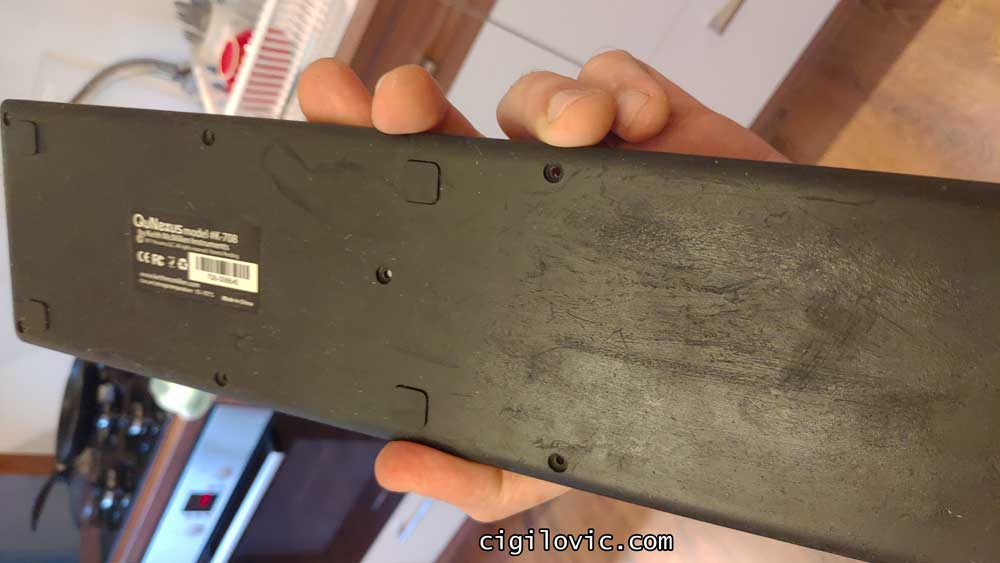
Or you can buy isopropyl alcohol, remove the top and bottom casings and apply it for 5 minutes. Then simply scratch that rubberised plastic. This method is not the best in terms of maintaining the cosmetics; however, I was able to manage cleaning this up without losing almost none of the labels on the top part. Hope these solutions will work for you!
*Did I mention it’s a real “tough” controller?

Pricing & Availability
Unfortunately, Keith McMillen’s product line was never easy to supply. You always needed to research and try to spot dealers and distributors and chase the product you were after. I believe after Keith’s passing, the company has lost some momentum as well. I used to see many KM products on Thomann, but this has got really worse. Recently, the company rebranded itself as Muse Kinetics, and we have started seeing Muse Kinetics (formerly Keith McMillen) products on Thomann!
Check out the Keith McMillen brand on Thomann here
Luckily, there are many used and brand new products that can be found on Reverb. So, don’t forget to check these out below.
Check out the Keith McMillen brand on Reverb here
Last but not least, don’t forget to check out Amazon stores. There are not many KM products, but you may find relevant accessories that are compatible with KM.
Check out the Keith McMillen brand on Amazon here
Anyway, thanks for reading so far, and I hope it’s been a helpful, honest, and fun review for you! Don’t forget to subscribe via the subscription form and get notified of my new releases. Thanks for visiting my blog and supporting me so far! I will hopefully see you in the next review here!